Guide (WIP)
As of:
January 12, 2026This guide helps you get started with the data-table and define columns, filters, schemas, adapters, and more.
If you have any questions or feature requests, please open an issue on GitHub. This is a work in progress and we are happy to hear from you.
The data-table uses shadcn/ui components. Some modifications live in src/components/custom/* but will eventually migrate back to shadcn/ui to be fully compliant.
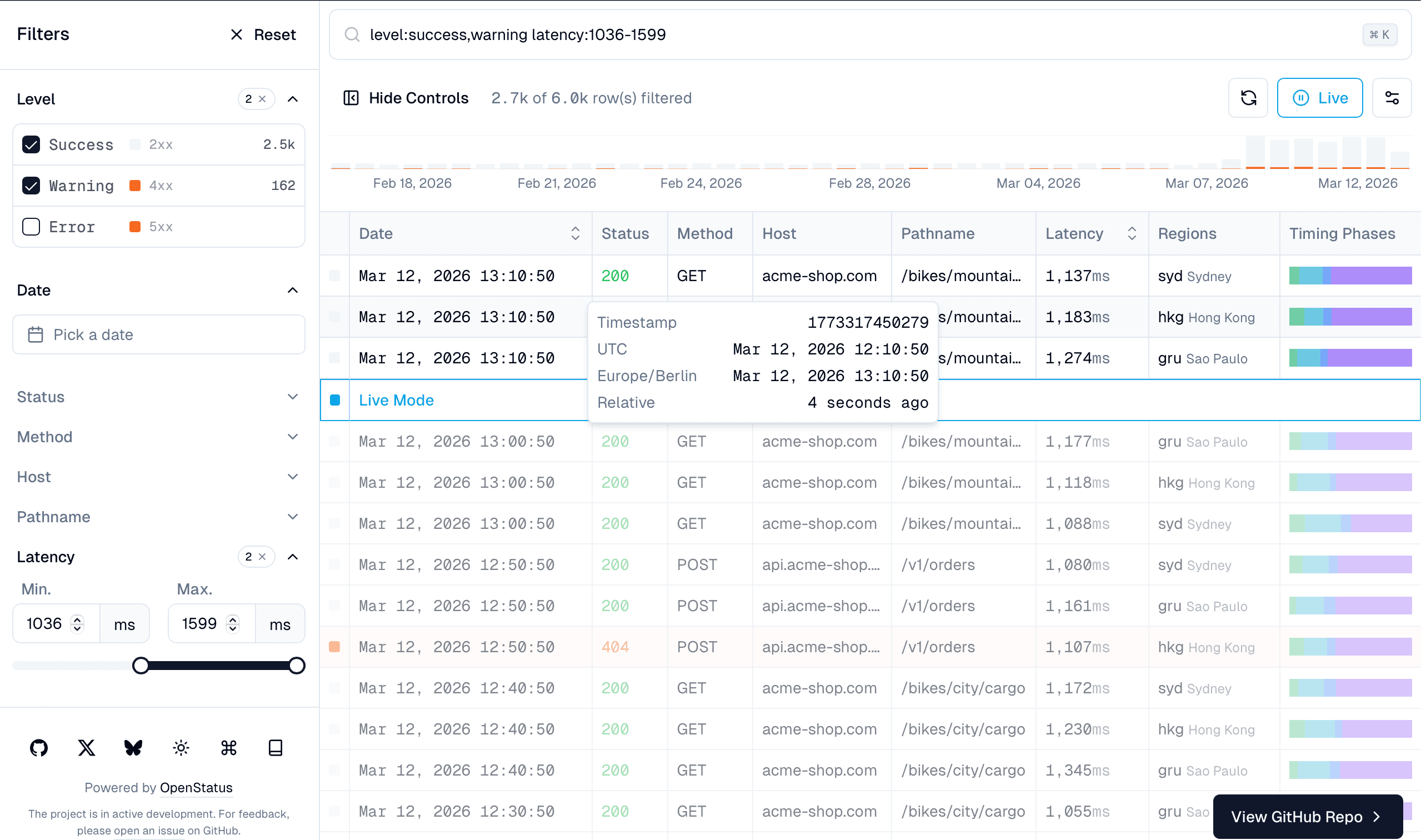
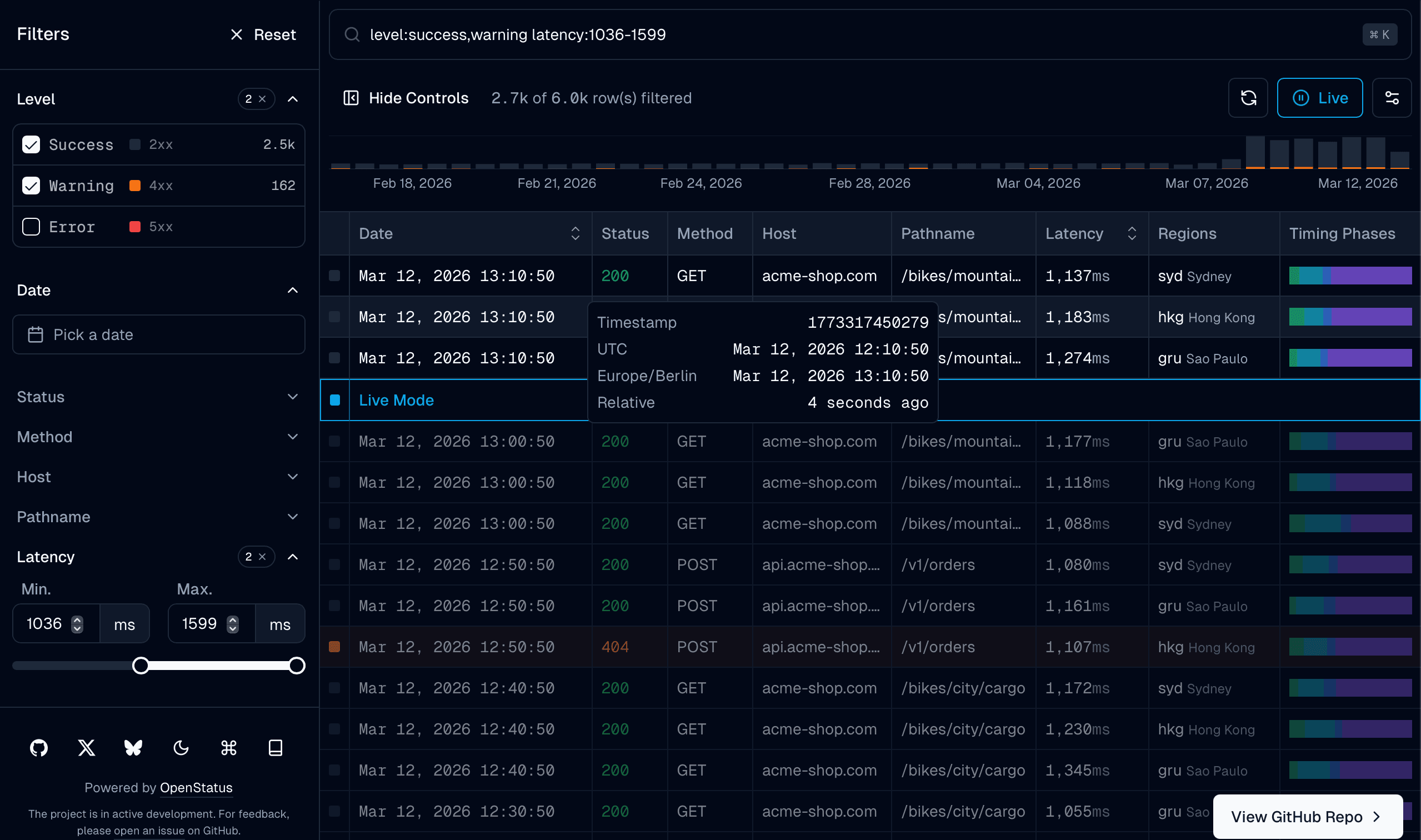
The infinite scrollable data-table is composed of the following parts:
DataTableFilterControls: the left sidebar controlsDataTableFilterCommand: the cmdk inputDataTableInfinite: the infinite data-tableDataTableDetailsSheet: the details sheetTimelineChart: the timeline chartDataTableStoreProvider: the BYOS state provider
You have full control over the data-table and the components that are rendered. Feel free to extend, modify, or remove components as you see fit.
Quick Start
The recommended approach uses BYOS (Bring Your Own Store) for filter state management. Here's a minimal setup:
// 1. Define your schema (schema.ts)
// 2. Create your client component (client.tsx)
import { DataTableStoreProvider, useFilterState } from "@/lib/store";
import { useNuqsAdapter } from "@/lib/store/adapters/nuqs";
import { createSchema, field } from "@/lib/store/schema";
export const filterSchema = createSchema({
status: field.array(field.number()).delimiter(","),
host: field.string(),
date: field.array(field.timestamp()).delimiter("-"),
});
export type FilterState = typeof filterSchema._type;
export function Client() {
const adapter = useNuqsAdapter(filterSchema.definition, { id: "my-table" });
return (
<DataTableStoreProvider adapter={adapter}>
<DataTableContent />
</DataTableStoreProvider>
);
}
function DataTableContent() {
const search = useFilterState<FilterState>();
const { data } = useInfiniteQuery(dataOptions(search));
// ... render your table
}BYOS (Bring Your Own Store)
BYOS is an adapter pattern that allows you to use any state management solution for your data-table filters. Instead of being locked into a specific library, you can use nuqs (URL-based), Zustand (client-side), or create your own custom adapter.
Why BYOS?
- Flexibility: Use the state management you're already using in your app
- SPAs without URL routing: Not every app needs filter state in the URL
- Single source of truth: Schema defines types, defaults, and serialization in one place
- Type safety: Full TypeScript inference from your schema
Schema Definition
The schema is the single source of truth for your filter fields. It defines types, default values, and serialization rules.
// schema.ts
import { createSchema, field } from "@/lib/store/schema";
export const filterSchema = createSchema({
// Checkbox filters (arrays of values)
level: field.array(field.stringLiteral(["success", "warning", "error"])),
method: field.array(field.stringLiteral(["GET", "POST", "PUT", "DELETE"])),
status: field.array(field.number()).delimiter(","),
regions: field.array(field.stringLiteral(["ams", "gru", "syd", "iad"])),
// Text input filters
host: field.string(),
pathname: field.string(),
// Slider filters (ranges)
latency: field.array(field.number()).delimiter("-"),
// Date range filter
date: field.array(field.timestamp()).delimiter("-"),
// Sorting
sort: field.sort(),
// Row selection
uuid: field.string(),
// Live mode toggle
live: field.boolean().default(false),
// Pagination
size: field.number().default(40),
cursor: field.timestamp(),
direction: field.stringLiteral(["prev", "next"]).default("next"),
});
// Infer TypeScript types automatically
export type FilterState = typeof filterSchema._type;Field Types
The field builders provide a fluent API for defining filter field types with serialization.
/**
* Primitive types - return null as default
*/
field.string(); // string | null - Basic string field
field.number(); // number | null - Integer field (uses parseInt)
field.boolean(); // boolean | null - Parses "true"/"false" strings
field.timestamp(); // Date | null - Serializes as milliseconds timestamp
/**
* Constrained types - type-safe string literals
*/
field.stringLiteral(["a", "b", "c"]); // 'a' | 'b' | 'c' | null
// Only parses values that exist in the literals array
/**
* Sorting field - special type for column sorting
* Serializes as "columnId.asc" or "columnId.desc"
*/
field.sort(); // { id: string; desc: boolean } | null
/**
* Array field - wraps any inner field type
* Default delimiter is "," for strings, "-" for numbers (slider ranges)
*/
field.array(field.string()); // string[]
field.array(field.number()); // number[] (uses "-" delimiter by default)
field.array(field.stringLiteral([...])); // Literal[]
/**
* Modifiers (chainable) - customize defaults and serialization
*/
field
.array(field.string())
.default(["default"]) // Set default value (used on reset)
.delimiter(","); // Set URL serialization delimiterAdapters
Adapters connect your schema to a state management solution. We provide two official adapters:
nuqs Adapter (URL-based)
The nuqs adapter syncs filter state to URL search params, enabling shareable URLs and browser history support.
import { useNuqsAdapter } from "@/lib/store/adapters/nuqs";
function Client() {
const adapter = useNuqsAdapter(filterSchema.definition, {
id: "my-table",
// Optional nuqs options:
shallow: true, // Don't trigger navigation
history: "push", // "push" | "replace"
throttleMs: 50, // Throttle URL updates
});
return (
<DataTableStoreProvider adapter={adapter}>
<DataTableContent />
</DataTableStoreProvider>
);
}For server-side parsing (in page.tsx or API routes):
// search-params.ts
import { createNuqsSearchParams } from "@/lib/store/adapters/nuqs/server";
export const { searchParamsParser, searchParamsCache, searchParamsSerializer } =
createNuqsSearchParams(filterSchema.definition);
// page.tsx
export default async function Page({ searchParams }) {
const search = await searchParamsCache.parse(searchParams);
// Use search for server-side data fetching...
}Zustand Adapter (Client-side)
The Zustand adapter integrates with existing Zustand stores, keeping filter state client-side only.
// store.ts
// client.tsx
import {
createFilterSlice,
useZustandAdapter,
} from "@/lib/store/adapters/zustand";
import { create } from "zustand";
export const useFilterStore = create<Record<string, unknown>>((set, get) => ({
// Your existing store state...
...createFilterSlice(filterSchema.definition, "my-table", set, get),
}));
function Client() {
const adapter = useZustandAdapter(useFilterStore, filterSchema.definition, {
id: "my-table",
});
return (
<DataTableStoreProvider adapter={adapter}>
<DataTableContent />
</DataTableStoreProvider>
);
}Switching Adapters
The /infinite route demonstrates switching between adapters at runtime using a cookie:
// page.tsx
import { ADAPTER_COOKIE_NAME } from "@/lib/constants/cookies";
export default async function Page() {
const cookieStore = await cookies();
const adapterType = cookieStore.get(ADAPTER_COOKIE_NAME)?.value || "nuqs";
return <Client defaultAdapterType={adapterType} />;
}
// client.tsx
export function Client({ defaultAdapterType }) {
return defaultAdapterType === "nuqs" ? <NuqsClient /> : <ZustandClient />;
}Custom Adapters
You can create custom adapters by implementing the StoreAdapter interface. This is useful for integrating with other state management libraries or custom storage solutions.
/**
* Store adapter interface that all adapters must implement.
* Designed to be compatible with React 18's useSyncExternalStore.
*/
interface StoreAdapter<T extends Record<string, unknown>> {
/**
* Subscribe to state changes.
* Compatible with useSyncExternalStore's subscribe parameter.
*
* @param listener - Callback to invoke when state changes
* @returns Unsubscribe function
*/
subscribe(listener: () => void): () => void;
/**
* Get the current state snapshot.
* Compatible with useSyncExternalStore's getSnapshot parameter.
*
* @returns Current state snapshot with version
*/
getSnapshot(): { state: T; version: number };
/**
* Get the server-side state snapshot (for SSR).
* Only implemented by URL-based adapters.
*/
getServerSnapshot?(): { state: T; version: number };
/**
* Update state with partial values.
* Must use immutable updates (new references for changed values).
*/
setState(partial: Partial<T>): void;
/**
* Update a single field value.
*/
setField<K extends keyof T>(key: K, value: T[K]): void;
/**
* Reset state to defaults.
* @param fields - Optional array of fields to reset. If omitted, resets all.
*/
reset(fields?: (keyof T)[]): void;
/**
* Pause state updates (for live mode).
* While paused, setState calls are queued.
*/
pause(): void;
/**
* Resume state updates.
* Applies any queued state changes.
*/
resume(): void;
/** Check if updates are paused. */
isPaused(): boolean;
/** Cleanup resources when adapter is destroyed. */
destroy(): void;
/** Get the unique table ID for this adapter. */
getTableId(): string;
/** Get the schema definition used by this adapter. */
getSchema(): SchemaDefinition;
/** Get the default values from the schema. */
getDefaults(): T;
}Provider & Hooks
DataTableStoreProvider
Wraps your components with the adapter context:
<DataTableStoreProvider adapter={adapter}>{children}</DataTableStoreProvider>useFilterState
Read filter state from the adapter. Uses useSyncExternalStore for optimal React 18+ compatibility.
/**
* Hook to read filter state from the adapter
*
* @example
* // Read entire state
* const state = useFilterState<FilterState>();
*
* // Read with selector (for performance - only re-renders when selected value changes)
* const regions = useFilterState<FilterState, string[]>((s) => s.regions);
*/
// Read entire state
const state = useFilterState<FilterState>();
// Read with selector (better performance - only re-renders when selected value changes)
const live = useFilterState<FilterState, boolean>((s) => s.live);
const regions = useFilterState<FilterState, string[]>((s) => s.regions);useFilterActions
Get actions to modify filter state.
/**
* Actions returned by useFilterActions
*/
interface FilterActions<T> {
/** Set a single filter field value */
setFilter: <K extends keyof T>(key: K, value: T[K]) => void;
/** Set multiple filter fields at once */
setFilters: (partial: Partial<T>) => void;
/** Reset a single filter field to its default value */
resetFilter: (key: keyof T) => void;
/** Reset all filters to default values */
resetAllFilters: () => void;
/** Pause state updates (for live mode) */
pause: () => void;
/** Resume state updates */
resume: () => void;
/** Check if updates are paused */
isPaused: () => boolean;
}
// Usage
const { setFilter, setFilters, resetFilter, resetAllFilters } =
useFilterActions<FilterState>();
// Set single field
setFilter("regions", ["ams", "gru"]);
// Set multiple fields at once
setFilters({ regions: ["ams"], host: "api.example.com" });
// Reset single field to default
resetFilter("regions");
// Reset all filters to defaults
resetAllFilters();useFilterField
Hook for working with a single filter field. Combines read and write operations.
/**
* Return type for useFilterField
*/
interface FilterFieldResult<T> {
/** Current value of the field */
value: T;
/** Set the field value */
setValue: (value: T) => void;
/** Reset the field to its default value */
reset: () => void;
}
// Usage
const { value, setValue, reset } = useFilterField<FilterState, "regions">(
"regions",
);
// Read value
console.log(value); // ['ams', 'gru']
// Update value
setValue(["ams", "gru", "fra"]);
// Reset to default
reset();Data Fetching Pattern
The recommended pattern for data fetching with BYOS:
function DataTableContent() {
// Read full state for data fetching
const search = useFilterState<FilterState>();
const { data, isFetching, fetchNextPage, hasNextPage } = useInfiniteQuery(
dataOptions(search),
);
// Destructure for defaultColumnFilters (exclude non-filter fields)
const { sort, cursor, direction, uuid, live, size, ...filter } = search;
const defaultColumnFilters = useMemo(() => {
return Object.entries(filter)
.map(([key, value]) => ({ id: key, value }))
.filter(({ value }) => {
if (value === null || value === undefined) return false;
if (Array.isArray(value) && value.length === 0) return false;
return true;
});
}, [filter]);
return (
<DataTableInfinite
data={data}
defaultColumnFilters={defaultColumnFilters}
defaultColumnSorting={sort ? [sort] : undefined}
schema={filterSchema.definition}
// ... other props
/>
);
}Table
Table Columns
The columns.tsx file is the source of truth for table columns. If you're familiar with shadcn, you should feel right at home. Check out the shadcn/ui docs for more information.
Extending Tanstack Table Types
We extend the meta types mainly for styling and filter functions:
import "@tanstack/react-table";
declare module "@tanstack/react-table" {
interface TableMeta<TData extends unknown> {
getRowClassName?: (row: Row<TData>) => string;
}
interface ColumnMeta {
headerClassName?: string;
cellClassName?: string;
label?: string;
}
interface FilterFns {
inDateRange?: FilterFn<any>;
arrSome?: FilterFn<any>;
}
}Table Rows
For performance with large datasets, rows are memoized with custom dependencies:
const MemoizedRow = React.memo(
Row,
(prev, next) =>
prev.row.id === next.row.id &&
prev.selected === next.selected &&
prev.visibleColumnIds === next.visibleColumnIds &&
prev.columnOrder === next.columnOrder,
) as typeof Row;
function Row({ row, selected, visibleColumnIds, columnOrder }) {
// Force re-render when live mode changes (for opacity styling)
useFilterState((s) => s.live);
return <TableRow /* ... */ />;
}The row re-renders only when:
- The row
idchanges - The
selectedstate changes - Visible columns change
- Column order changes
- Live mode toggles (via the
useFilterStatehook)
At a certain point, consider adding
@tanstack/react-virtualfor virtualization.
Filters
filterFields
The filterFields array in constants.tsx defines the left sidebar controls and cmdk input items.
Supported types: input, checkbox, slider, timerange
All types extend the Base type:
export type Base<TData> = {
/** Display label for the filter */
label: string;
/** Key in TData that this filter controls */
value: keyof TData;
/**
* Defines if the accordion in the filter bar is open by default
*/
defaultOpen?: boolean;
/**
* Defines if the command input is disabled for this field.
* Use this for fields that shouldn't be searchable via ⌘K.
*/
commandDisabled?: boolean;
};Option Type
All filter types use the Option type for their selectable values:
export type Option = {
label: string;
value: string | boolean | number | undefined;
};Input
Text input filter with optional autocomplete suggestions.
export type Input = {
type: "input";
/** Optional suggestions for autocomplete */
options?: Option[];
};Checkbox
Multi-select checkbox filter. The most common filter type.
export type Checkbox = {
type: "checkbox";
/** Custom component to render each option (e.g., status badge, region flag) */
component?: (props: Option) => JSX.Element | null;
/** Available options to select from */
options?: Option[];
};Slider
Range slider filter for numeric values (e.g., latency, price).
export type Slider = {
type: "slider";
/** Minimum value */
min: number;
/** Maximum value */
max: number;
/**
* If options is undefined, all steps between min and max are provided.
* Use options to define specific steps.
*/
options?: Option[];
};Timerange
Date range picker with optional preset shortcuts.
export type Timerange = {
type: "timerange";
options?: Option[];
/** Quick select presets like "Last 24 hours", "Last 7 days" */
presets?: DatePreset[];
};
export type DatePreset = {
/** Display label (e.g., "Last 24 hours") */
label: string;
/** Start date of the range */
from: Date;
/** End date of the range */
to: Date;
/** Keyboard shortcut key (shown in UI) */
shortcut: string;
};Details Sheet
The sheetFields array defines the components inside the Sheet component when a row is selected.
export type SheetField<TData, TMeta = Record<string, unknown>> = {
/** Key in TData to display */
id: keyof TData;
/** Label shown above the field */
label: string;
/**
* Field type:
* - "readonly": Display only (e.g., uuid to copy)
* - "input": Text input for editing
* - "checkbox": Multi-select
* - "slider": Range slider
* - "timerange": Date picker
*/
type: "readonly" | "input" | "checkbox" | "slider" | "timerange";
/**
* Custom component to render the field value.
* Receives the full row data plus optional metadata (totalRows, filterRows, etc.)
*/
component?: (
props: TData & {
metadata?: {
totalRows: number;
filterRows: number;
totalRowsFetched: number;
} & TMeta;
},
) => JSX.Element | null | string;
/** Conditionally show/hide this field based on row data */
condition?: (props: TData) => boolean;
/** Additional CSS classes for the field container */
className?: string;
/** CSS classes for the loading skeleton */
skeletonClassName?: string;
};API
We use @tanstack/react-query and useInfiniteQuery for data fetching.
Your API must return:
export async function GET(req: Request) {
return Response.json({
data: ColumnSchema[],
meta: {
totalRowCount: number,
filterRowCount: number,
chartData: BaseChartSchema[],
facets: Record<string, FacetMetadataSchema>,
metadata?: TMeta,
},
nextCursor: number | null, // timestamp of last item
prevCursor: number | null, // timestamp of first item (for live mode)
});
}We use superjson to serialize/deserialize Date objects and other non-serializable values.
More
Timeline Chart
The timeline chart visualizes data over time using shadcn components:
type BaseChartSchema = {
timestamp: number;
[key: string]: number; // expects "success", "warning", "error"
};Live Mode
Live mode fetches new data every 5 seconds using fetchPreviousPage from useInfiniteQuery.
The live field in the schema controls this behavior. When enabled, new data is prepended to the beginning of the data array.
Server Prefetch & Configuration
The /infinite route supports server-side prefetching with React Query's HydrationBoundary. This can be toggled via cookies.
Configuration Dropdown
The configuration dropdown in the sidebar footer allows toggling:
- Adapter Type: Switch between
nuqs(URL) andzustand(client-side) - Server Prefetch: Enable/disable server-side data prefetching
Both settings are persisted in cookies (data-table-adapter and data-table-prefetch).
Keyboard Shortcuts
Available keyboard shortcuts (accessible via the Command icon in the sidebar):
⌘K- Toggle command input⌘B- Toggle sidebar controls⌘U- Reset column state (order, visibility)⌘J- Toggle live modeEsc- Reset table filters⌘.- Reset element focus to start
Debugging
We use react-scan for performance debugging. Enable it by setting:
# .env.local
NEXT_PUBLIC_REACT_SCAN=true
For Tanstack Query, the ReactQueryDevtools appear automatically in development.
For Tanstack Table debug logs:
NEXT_PUBLIC_TABLE_DEBUG=true